Business reporting & data integration

Business reporting.
Connected to your data.

Bring selected business systems into a reporting workflow your team can understand and maintain. Start with one recurring decision, the information behind it, and clear definitions for the numbers being reviewed.

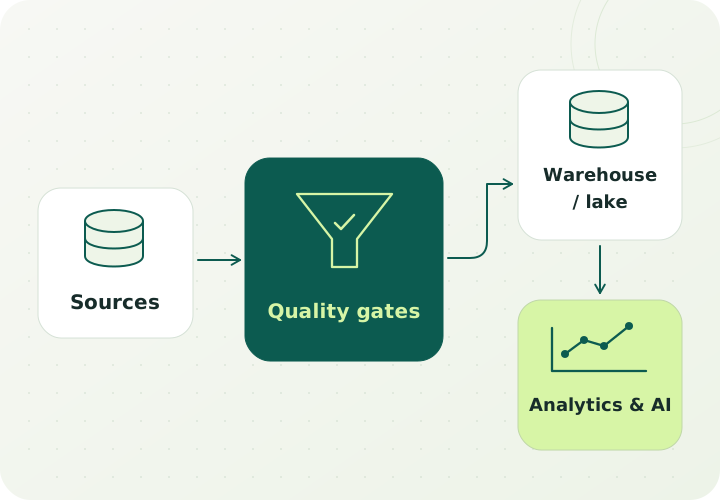
Source data passes through quality gates into a warehouse or lake for analytics and AI.
Data engineering / a dependable information flowConcept illustration
Built around the work

Spend less effort assembling the picture.

A report can look finished while its preparation remains fragile. Someone downloads several exports, fixes inconsistent labels, joins records, and explains why another department's version differs. The problem may be the data flow, the definitions, the source quality, or a combination of all three.

Isospins can scope data pipelines, ETL or ELT processing, data quality checks, analytics, and reporting around the decision the report supports. A first engagement can connect a selected set of sources and produce one useful view, with ownership and exception handling documented.

The same report is rebuilt from exports

Recurring preparation depends on individual spreadsheet steps and knowledge. Map those transformations and decide which can become a documented, repeatable pipeline.

For example: An operations report draws from selected order, inventory, and support records using an agreed refresh process.

Teams disagree about the same measure

A customer, completed order, outstanding task, or return may be defined differently across systems. Establish the definitions and source of each measure before building another dashboard.

For example: Sales and operations review the same documented definition of a completed order and can trace it to the underlying records.

Missing or inconsistent data is found too late

Duplicate records, unmatched identifiers, late updates, and missing values can affect a report. Make quality checks and exceptions visible within the reporting workflow.

For example: A report owner sees which source has not refreshed and which records need review before using the result.

Who this fits

A useful starting point when the decision is known

Begin with the question a team needs to answer, then work back to the necessary records. More data is not automatically a better scope; a first project needs enough information to support one defined decision.

  • Owners or managers combining information from spreadsheets and several business applications.
  • Operations, sales, service, or finance teams preparing a recurring management report.
  • Businesses that need clearer metric definitions, data ownership, or refresh responsibilities.
  • Teams planning AI or forecasting that first need to understand their historical data and its limitations.
A scoped first engagement

One recurring report, with a traceable data flow

Choose a report used for a real decision. Define a manageable set of source systems, agreed measures, a suitable refresh approach, and the conditions that require investigation before the report is used.

  1. Follow each measure to its source

    Document the business definition, source records, transformations, and any manual adjustments behind the report.

  2. Review the available data

    Assess identifiers, missing values, duplicates, historical coverage, and how source changes are communicated.

  3. Build a scoped reporting flow

    Implement the agreed extraction and transformation steps, checks, and reporting view for the selected sources.

  4. Reconcile and hand over

    Compare the output with known records, document exceptions and refresh behavior, and agree who maintains each part.

What to bring

  • The existing report, the decision it supports, and the person responsible for it.
  • Representative source exports, database tables, or API documentation available for assessment.
  • Current metric definitions, identifier mappings, known data issues, and access owners.
  • Requirements for freshness, permissions, retention, and the reporting environment.

What the scope can include

  • A source inventory, access map, and current-to-proposed data flow.
  • A shared metric dictionary and source-to-report mapping.
  • A scoped integration pipeline, transformation specification, and reporting view.
  • Data quality checks, reconciliation results, and an exception-handling process.
  • Refresh, monitoring, maintenance, and operational handover documentation.

The decision it supports: Decide whether the selected reporting flow is reliable and useful enough to operate, and which additional sources or decisions should be considered next.

How to judge the work

Agree the baseline.
Evaluate the whole workflow.

Define these measures with your team after reviewing the starting point. Use the findings to decide whether to expand the scope.

Reconciliation and traceability

Check whether agreed totals and selected records reconcile with the source systems. Make definitions and adjustments visible so a reviewer can understand where a result came from.

Freshness and completeness

Assess whether the report is refreshed as intended, whether required records are included, and how missing or delayed information is surfaced.

Preparation and operating effort

Compare recurring preparation, investigation, and maintenance work with the baseline process. Include the report owner's ability to use the output and resolve an exception.

Systems and ownership

Start with the access
you can account for.

Sources and destinations to assess can include:

  • Spreadsheets, CSV exports, relational databases, and existing reporting datasets.
  • CRM, accounting, ecommerce, inventory, and support systems with authorized access.
  • A cloud warehouse, data lake, reporting tool, or existing application suited to the agreed scope.

Define the boundaries

Interfaces, export limits, source ownership, and licensing are reviewed before implementation. The scope can begin with batch processing; more frequent updates should be driven by the decision and the source systems' capabilities.

Before we begin

Questions to help
you choose the next step.

Do we need a data warehouse before improving our reports?

The architecture depends on the sources, the reporting need, access, and expected operating effort. A first project may use a scoped integration and an existing reporting environment. Discovery can compare that approach with a warehouse or data lake where either would serve a defined need.

Can you work with spreadsheets and manual exports?

They can be part of the source assessment. The review should document how the files are prepared, what they contain, and which steps depend on a person. It can then identify which parts to retain, validate, or replace with an available interface.

What if our data is inconsistent?

The first scope can include profiling, agreed definitions, and a visible exception process. It should distinguish issues that can be handled in the pipeline from changes that require a source owner. The proposed reporting view should make important limitations clear.

Can the report update in real time?

The required freshness should follow the business decision and the interfaces available. Real-time and batch processing are both within the wider data engineering practice. The proposal should explain the refresh approach, the dependencies it creates, and who will operate it.

Will a new dashboard fix our reporting problem?

A dashboard is one part of the workflow. The underlying definitions, records, transformations, and refresh process need to support it. A useful engagement addresses those foundations alongside the view used by the business.

Can this prepare us for forecasting or AI?

A documented data flow can clarify which historical information is available and what its limitations are. A later forecasting or AI scope still needs a defined use case, suitable data, and its own evaluation. Reporting readiness is one input to that decision.

Your next step

Start with the report your team keeps rebuilding.

Tell us which decision the report supports, where the information comes from, and which parts currently need manual work. We can discuss a focused integration scope.

Discuss a reporting workflow

Prefer to organize the idea first?

Use the free project planner to create a short brief about your workflow, information, ownership, and evaluation.

Open the project planner
Let's build something useful

Big idea. Complex challenge.
Let's find your next step.

Start a conversation about your application, AI opportunity, or cloud environment.

Discuss your project