AI document automation. A source for the next step.
Help your team find approved information, organize incoming documents, and prepare work for review. Start with one document type or one knowledge workflow, with source access and human decisions clearly defined.
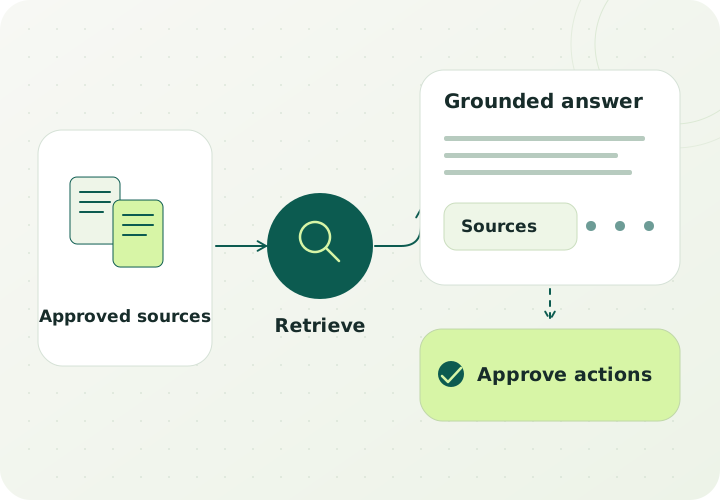
Generative AI / grounded in your informationConcept illustration
Built around the work
Turn scattered documents into useful work.
A question arrives and someone searches folders, checks an older answer, and asks a colleague which document is current. Elsewhere, staff copy the same fields from incoming forms into a system. These are distinct tasks, and each deserves a scope based on the documents, users, and exceptions involved.
Isospins can assess document extraction, classification, summarization, and knowledge assistance using natural language processing, generative AI, data engineering, and application integration. A first project can test one approved collection or one intake queue before connecting additional sources or actions.
Staff repeatedly search for the same answers
Policies, product details, procedures, and internal guidance are distributed across files. A knowledge assistant can retrieve relevant material and prepare an answer with references for the user to inspect.
For example: A support employee finds the approved returns policy and checks the source before responding to a customer.
Incoming documents require repeated re-entry
Forms, requests, and supporting documents arrive in different layouts. A scoped extraction workflow can prepare selected fields, show the source, and send missing or ambiguous information to a review queue.
For example: An operations team reviews extracted supplier details before an approved update is sent to a business system.
Useful information is buried inside long files
Teams need a consistent way to locate clauses, obligations, issues, or requested information. Define a document playbook and an evaluation set so proposed findings can be checked against the underlying text.
For example: A professional-services team receives a draft document summary with references and reviews it before using the findings.
Who this fits
Start where the source and the review are clear
A useful candidate has a recurring document task, an approved information collection, and people who can judge the result. The same discovery should identify whether the main obstacle is extraction, document quality, access, or the workflow itself.
Customer service or operations teams answering recurring questions from approved material.
Businesses handling repeat forms, requests, or document packages with known fields to review.
Professional teams searching internal knowledge or preparing source-based document summaries.
A process owner who can define examples, review exceptions, and approve the intended system actions.
A scoped first engagement
One document queue or one knowledge collection
Choose a single workflow and compare a prototype with the current process. The starting scope can be a read-only assistant or a document preparation queue; any updates to business systems are specified separately with the required approval steps.
01
Define the task
Choose retrieval, extraction, classification, or summarization. Document the expected output and the situations that require a person to take over.
02
Prepare the approved sources
Review file types, text quality, versions, access boundaries, and how updates or removals will reach the application.
03
Prototype the review workflow
Make the relevant source material visible alongside the proposed answer or extracted fields. Keep the initial actions within the agreed scope.
04
Evaluate before expanding
Test representative questions, incomplete documents, conflicting sources, and unsupported requests. Use the findings to decide the next implementation step.
What to bring
An approved sample of documents or knowledge pages, including common exceptions.
Examples of questions, fields, or findings that the workflow should support.
The source owner, intended users, access rules, and document update process.
A reviewer who can define acceptable output and record why an example passes or fails.
What the scope can include
A document or knowledge-source inventory and access map.
A task specification, field definitions or answer criteria, and a representative evaluation set.
A scoped assistant or extraction prototype with source inspection and review states.
An evaluation report covering useful outputs, failures, unsupported inputs, and review effort.
A deployment proposal covering source updates, integration boundaries, operating ownership, and handover.
The decision it supports: Decide whether the prototype is useful enough to develop further, whether the source material needs work, and which actions should remain with staff.
How to judge the work
Agree the baseline. Evaluate the whole workflow.
Define these measures with your team after reviewing the starting point. Use the findings to decide whether to expand the scope.
Correctness on agreed examples
Assess whether extracted fields, classifications, or answers match the reviewed source and the expected task. Record the types of errors that matter to the workflow.
Source visibility and appropriate handoff
Check that users can inspect the relevant evidence and that missing, outdated, conflicting, or unsupported information leads to the intended review path.
Total effort, including review
Compare searching, re-entry, correction, and approval effort with the current process. Include the ongoing work of maintaining sources and access permissions.
Systems and ownership
Start with the access you can account for.
Possible integration points to assess include:
Approved PDFs, word-processing files, knowledge pages, and document repositories.
CRM or support records used to provide permitted context or receive an approved result.
Application APIs, cloud storage, and selected model services within the agreed architecture.
Define the boundaries
The scope depends on source quality and authorized interfaces. Scanned files may require a separate extraction assessment. A first prototype does not imply unrestricted repository access or automatic changes to customer, clinical, financial, or legal records.
Before we begin
Questions to help you choose the next step.
What is the difference between document automation and a knowledge assistant?
Document automation usually follows a defined task such as extracting fields or routing a document for review. A knowledge assistant helps users retrieve and work with approved information in response to a question. They can share a data foundation, but their outputs and evaluation criteria should be specified separately.
Can an assistant work with our internal documents?
That depends on the documents, the intended users, and the access your systems provide. Discovery should establish which sources are approved, how permissions will be applied, and how information is updated or removed. The prototype can begin with a limited collection.
Will it always give the correct answer?
The project should test correctness on representative examples and define how the workflow handles uncertainty. Source references help a reviewer inspect the material, but do not replace that review. Unsupported questions and conflicting documents belong in the evaluation set.
Can we start without connecting to all our systems?
A first scope can use an approved sample or a limited repository and prepare output for a person to review. Broader integration can follow if the evidence supports it and the required interfaces and operating responsibilities are available.
Can it update records or send responses automatically?
Any operational action needs its own agreed rules, permissions, and approval boundaries. The initial scope can remain read-only or prepare a draft. Consequential changes and professional decisions require the appropriately authorized people in the workflow.
What should we bring to a first conversation?
Describe the document task, who performs it, the systems involved, and examples of the result you need. A proposed engagement can define how representative material will be shared and assessed through an agreed channel.
 isospins